Usage
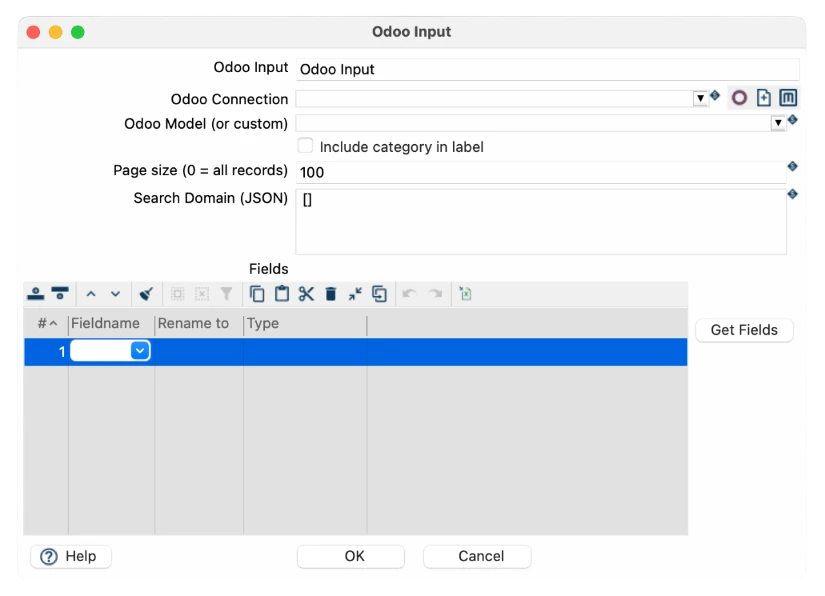
This transform can be added to your Hop pipeline to automatically retrieve records from Odoo models. Examples include:
- Extracting users (res.users) for reporting or auditing.
- Fetching CRM data (res.partner) for analytics pipelines.
- Retrieving website pages (website.page) for content processing or SEO reporting.
Records can be filtered using domains, and only the fields required for your pipeline need to be selected.
Connection configuration
Before using the transform, you must define an Odoo database connection. The fields required are:

Field | Required | Description |
Odoo connection name | Yes | A descriptive name for the connection in Hop. |
Base URL (domain) | Yes | Full URL of the Odoo instance, e.g., https://mycompany.odoo.com. |
Username | Yes | Odoo username for authentication (or API user). |
Password | Yes | Odoo password or API key, depending on authentication method. |
Database | Yes | Name of the Odoo database to query. |
Odoo Input transform fields
Field | Required | Description |
Odoo Input | Yes | The name of the transform as it appears in the pipeline. |
Odoo Connection | Yes | Select one of the previously defined Odoo connections. |
Odoo Model | Yes | The Odoo model to retrieve records from (e.g., res.users, res.groups, slide.channel, website.page, res.partner). |
Fields | Yes | List of fields to fetch from the selected model. You can use the Get Fields button to automatically load available fields for the chosen model. |
Example: website.page model fields
Here are some fields you can retrieve when selecting the website.page model:
Field Name | Type | ID |
url | String | 46 |
visibility_password_display | String | 50 |
website_absolute_url | String | 52 |
website_id | String | 53 |
website_meta_title | Boolean | 58 |
website_published | Boolean | 59 |
website_url | String | 60 |
write_date | String | 61 |
write_uid | String | 62 |
xml_id | String | 63 |